
MCP V2
MCP V2
ATTOM has launched MCP V2, the latest version of the ATTOM MCP Server, as part of the ATTOM Intelligence Platform.
MCP V2 provides an enhanced way to connect AI applications and workflows with ATTOM property data using the Model Context Protocol (MCP). It is designed to make it easier for customers to incorporate ATTOM data and intelligence into AI-powered applications, agents, and workflows.
Learn More About MCP V2
Learn more about the ATTOM MCP Server, including how MCP can enable AI applications and agents to interact with ATTOM property data:
Request Access
Access to MCP V2 requires provisioning through the ATTOM Intelligence Platform and is not currently available through self-service activation.
If you are an existing ATTOM customer and would like to request access to MCP V2, contact your ATTOM Sales Representative to discuss availability and enablement for your account.
Don't know who your ATTOM Sales Representative is, or interested in MCP V2 but not currently an ATTOM customer?
Once access has been provisioned, your ATTOM team will provide the information needed to get started with MCP V2.
Connect in Claude and ChatGPT
Who can use it. ATTOM MCP is for ATTOM customers whose account has ATTOM MCP access. To get access, contact your ATTOM representative or reach us through https://www.attomdata.com/contact-us/.
Server address
https://mcp.intelligence.attomdata.com
You don’t need an API key or a client secret. The first time you connect, you sign in with your ATTOM account.
Connect in Claude
These steps work in Claude on the web, Claude Desktop and Cowork.
In Claude, open Customize > Connectors.
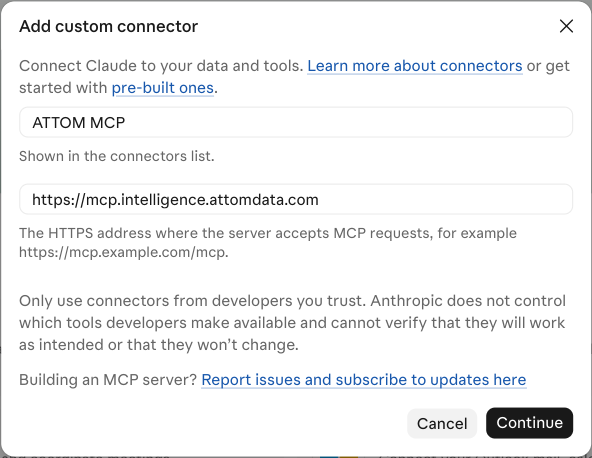
Click + Add, then Add custom connector.
Enter the name ATTOM MCP and the server address https://mcp.intelligence.attomdata.com, then click Continue.
Keep the sign-in settings Claude detects and click Add.
Sign in to ATTOM when asked (see Signing in below).
In a chat, click + at the lower left, choose Connectors, and turn on ATTOM MCP.
Claude Team and Enterprise. An organization Owner adds the connector once: Organization settings > Connectors, click Add, then Custom > Web, and use the same name and server address. Each member then opens Customize > Connectors, finds ATTOM MCP, clicks Connect and signs in with their own ATTOM account.
Connect in ChatGPT
In ChatGPT, open Plugins (chatgpt.com/plugins).
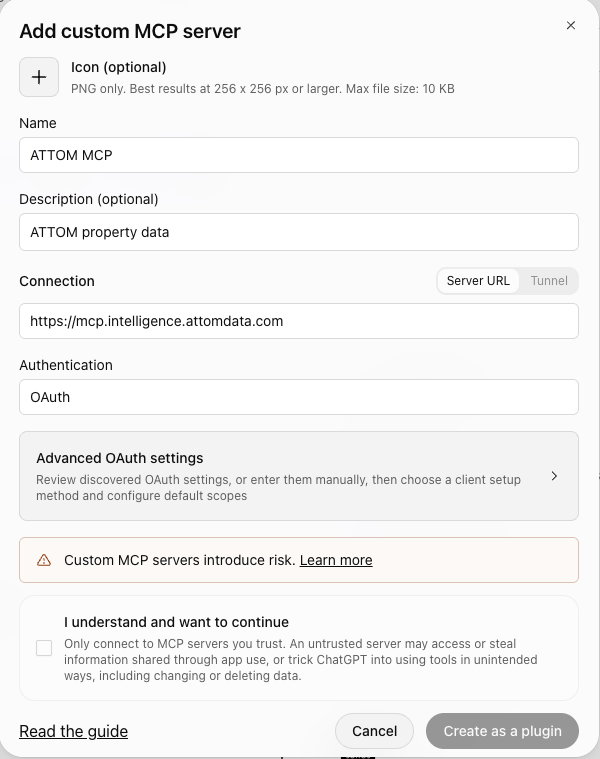
Click Add at the top right, then Add custom MCP server.
Enter the name ATTOM MCP and a short description, such as “ATTOM property data”.
Under Connection, keep Server URL selected and enter https://mcp.intelligence.attomdata.com. Leave Authentication set to OAuth.
Tick I understand and want to continue, then click Create as a plugin.
Click Connect ATTOM MCP and sign in to ATTOM (see Signing in below).
In a new chat, type @ and select ATTOM MCP, then ask your question.
If you use ChatGPT through your company, your workspace admin may need to allow custom MCP servers first.
Signing in
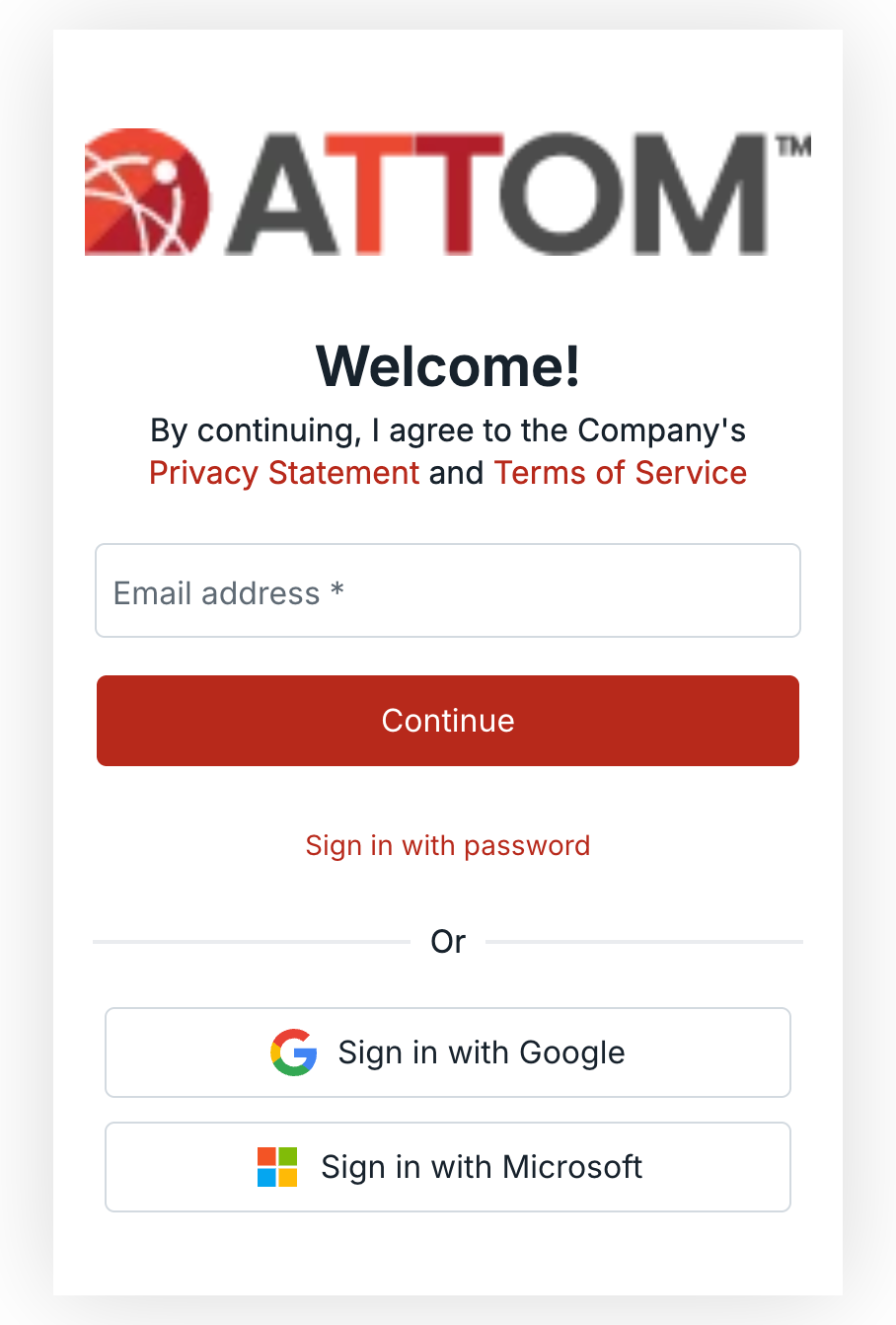
On the ATTOM sign-in page, enter your work email and the one-time code we email you, or choose Google or Microsoft. Use the email address linked to your ATTOM account.
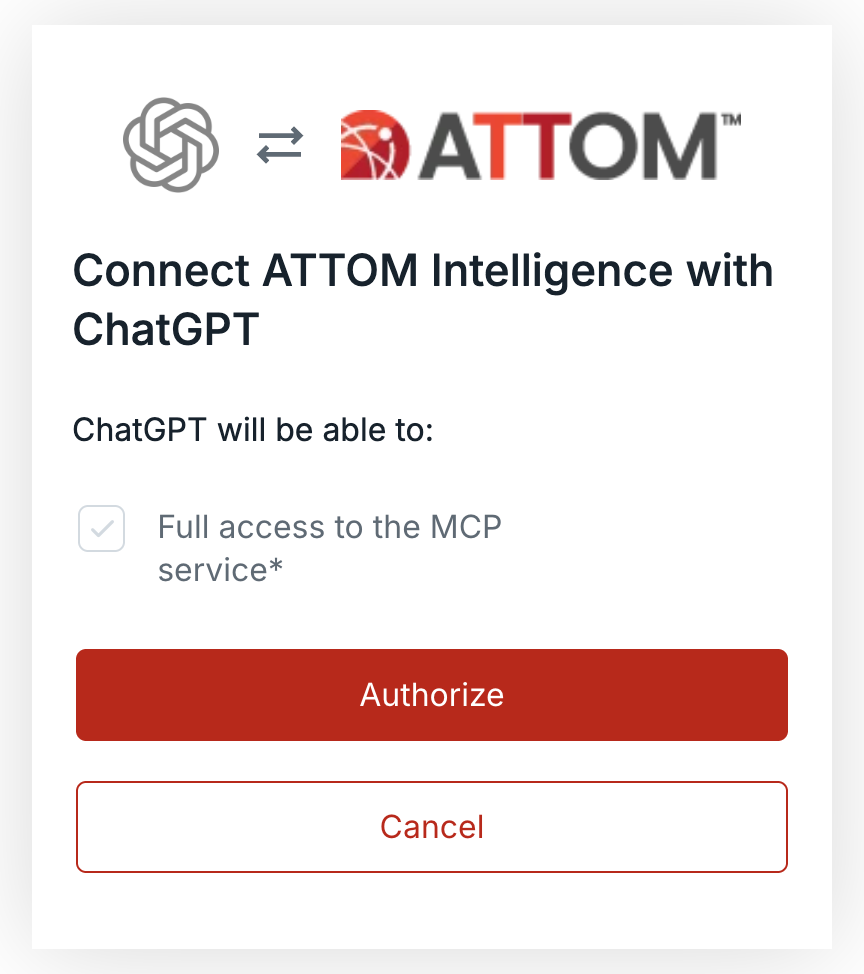
On the “Connect ATTOM Intelligence” screen, click Authorize. You return to Claude or ChatGPT, connected.
If sign-in says your account doesn’t have ATTOM MCP access, contact your ATTOM representative.
What you can do
ATTOM MCP gives your AI assistant read-only access to ATTOM property and area data:
property details, ownership, and sale, mortgage, tax and foreclosure history;
estimated values and comparable sales;
neighborhood profiles, schools and nearby places;
plain-language definitions of ATTOM data fields.
Coverage varies by property and area, and answers note when data isn’t available. Building permits are an add-on; ask your ATTOM representative.
Try asking:
Using ATTOM, look up 4529 Winona Ct, Denver, CO and summarize the property.
Show the sales and mortgage history for 4529 Winona Ct, Denver, CO.
Find recent comparable sales for 4529 Winona Ct, Denver, CO.
Give me a community profile for ZIP code 80212 in Denver, CO.
What restaurants and coffee shops are within a mile of 4529 Winona Ct, Denver, CO?
Trouble connecting? Email ATTOM Technical Support at datacustomercare@attomdata.com.
Need Help?
If you are already provisioned for MCP V2 and need technical assistance, contact ATTOM Technical Support through datacustomercare@attomdata.com.